
Choosing the right Apex gaming PC is about more than buying the most expensive hardware. Apex Legends can run on relatively modest hardware, but the experience you get depends on the balance between your CPU, GPU, RAM, storage, display, and other components.
EA’s official PC requirements list Windows 10 64-bit, 6 GB of RAM, and a GTX 950 or Radeon HD 7790-class graphics card as the minimum requirements. EA recommends an Intel Core i5-3570K or equivalent, 8 GB of RAM, and a GTX 970 or Radeon R9 290-class GPU for a smooth 60 FPS experience. EA also lists 75 GB of free storage.
Those requirements are useful as a baseline, but anyone buying a new PC should consider current hardware, the games they play, their target resolution, and the frame rate they want. A balanced system is generally more useful than spending most of the budget on one component.
What Is an Apex Gaming PC?
It is a desktop computer configured to play Apex Legends effectively. There is no single official PC called an “Apex gaming PC.” Instead, the term describes a gaming computer selected around the performance needs and preferences of an Apex Legends player.
A good setup combines the main internal components with a suitable monitor and gaming peripherals. The objective is to create a system that delivers the performance you want without wasting money on hardware that does not match the rest of the build.
Understanding the Apex Gaming PC Setup
The core of a gaming PC includes the CPU, GPU, RAM, motherboard, storage, power supply, cooling system, and case. The monitor, keyboard, mouse, and headset complete the setup.
For example, buying a very powerful GPU while using a processor that cannot keep up may prevent the graphics card from reaching its full potential. The opposite can also happen when a powerful CPU is paired with a graphics card that cannot render frames quickly enough.
Why PC Hardware Matters for Gaming
Different PC components handle different parts of the gaming workload. The CPU processes game instructions and sends rendering information to the GPU, while the GPU performs much of the graphics rendering.
RAM provides working memory for the system, while storage affects how quickly data can be accessed and games can load. The monitor also matters because a display needs to be capable of showing the frame rates and resolution your hardware produces.
Who Should Consider an Apex Gaming PC?
It is a good option for players who want control over graphics settings, PC hardware, display choices, and future upgrades.
It can also be useful for gamers who play multiple PC games, stream gameplay, communicate through applications such as Discord, or use the same computer for work and entertainment.
Key Specifications for an Apex Gaming PC
There is no single specification list that is perfect for every player. Your ideal hardware depends on your budget, target resolution, desired FPS, and other games you plan to play.
Choosing the Right CPU
The CPU handles many game-related calculations and sends instructions to the GPU. Intel notes that CPU requirements vary between games and workloads, and a CPU can become a limiting factor when the rest of the system is significantly more powerful.
For a new Apex gaming PC, choose a modern processor that is appropriately matched to your graphics card. If you also plan to stream, record gameplay, or multitask while playing, consider a CPU with enough resources for those additional workloads.
Selecting a Powerful GPU
The GPU is one of the most important components for gaming because it performs much of the graphical rendering. Your choice should depend on the resolution and graphical settings you want to use.
A higher-resolution gaming setup generally requires more graphics performance. Intel also emphasizes that CPU and GPU selection should be balanced rather than focusing entirely on one component.
How Much RAM Do You Need?
EA lists 6 GB of RAM as the minimum requirement for Apex Legends and 8 GB as its recommended specification.
For a new gaming PC, however, you should consider your complete workload. Intel notes that 16 GB has increasingly become a common gaming standard and can provide more room when gaming alongside applications such as Discord or streaming software.
SSD Storage and Loading Times
EA currently lists 75 GB of free storage for Apex Legends. An SSD is a sensible choice for a modern gaming PC because it provides faster data access than a traditional HDD. Intel explains that older hard drives can contribute to longer loading times and that SSD storage provides significantly faster access to data.
An SSD will not replace the need for a capable CPU or GPU, but it can make loading and general system use more responsive.
The Importance of a Reliable Power Supply
The power supply, or PSU, provides electricity to the PC’s components. Its capacity should be appropriate for the complete system, particularly the CPU and GPU.
Do not select a PSU based only on the graphics card. Consider the requirements of all major components and leave reasonable room for the system’s overall power needs.
Best Apex Gaming PC Setup for Smooth Gameplay
The computer itself is only part of the experience. Your monitor and peripherals can also affect how comfortable and responsive gaming feels.
Choosing the Right Gaming Monitor
Your monitor should match your PC’s capabilities. A high-refresh-rate display can be useful when your computer is capable of producing high frame rates.
Intel notes that the display can become a bottleneck when it cannot take advantage of the resolution or frame rates produced by the rest of the system.
Keyboard and Mouse for Competitive Gaming
A keyboard and mouse are standard choices for PC gaming, although Apex Legends also supports controllers on PC.
Rather than choosing peripherals solely because they are expensive, focus on comfort, consistent input, appropriate sensitivity, and a design that suits your playing style.
Gaming Headset and Audio
Clear audio can be useful in a competitive shooter because sound provides information about what is happening around the player.
A good headset should be comfortable for long sessions and provide clear game audio and reliable voice communication. Personal preference matters, so there is no single headset that is best for every player.
Cooling and Airflow
Gaming can place sustained loads on the CPU and GPU, making appropriate cooling important. A case should have sensible airflow, while the CPU cooler should be suitable for the processor being used.
Keeping vents clear and maintaining the cooling system can also help the PC operate reliably over time.
Desk and Gaming Setup Considerations
A comfortable desk setup can make long gaming sessions easier. Position the monitor comfortably, keep cables organized, and make sure the PC has enough space around its ventilation areas. Good organization also makes cleaning and maintenance simpler.
How PC Specs Affect Apex Gaming PC Performance
Gaming performance is produced by the entire system. The same CPU or GPU can produce different results depending on the game, resolution, graphics settings, drivers, and other hardware. Intel specifically notes that performance varies according to game, resolution, settings, and system configuration.
CPU and Game Performance
The CPU handles game logic and other instructions before sending rendering work to the GPU. If the CPU cannot keep up, it can limit the performance of a faster graphics card.
GPU and Graphics Quality
The GPU performs much of the visual rendering. Higher resolutions and demanding graphics settings can increase the workload placed on the GPU.
For that reason, your target resolution should be one of the first things you consider when selecting a graphics card.
RAM and Multitasking
Having sufficient RAM helps the PC handle the game and other applications at the same time. Intel identifies insufficient memory as a possible limitation, particularly when gaming alongside other applications.
SSD and Game Loading
An SSD primarily improves storage access and loading behavior rather than directly increasing rendering performance. It is therefore useful for responsiveness but should not be treated as a substitute for a stronger CPU or GPU.
Refresh Rate and FPS
FPS refers to the number of frames the PC renders per second, while refresh rate refers to how frequently a monitor refreshes its image.
Intel explains that higher frame rates can produce smoother-looking movement and can make it possible to react more quickly to visual changes.
How to Optimize an Apex Gaming PC for Better Performance
Before replacing hardware, check whether software and settings are responsible for the problem.
Update Graphics Drivers
Intel recommends checking graphics drivers when troubleshooting low FPS and gaming problems. Keeping drivers updated can help maintain compatibility and performance.
If a new driver creates instability, Intel also notes that rolling back to an earlier driver can sometimes be appropriate.
Optimize In-Game Graphics Settings
Apex Legends provides several graphics settings that allow PC players to adjust the visual experience and performance. EA’s documentation includes settings such as texture streaming budget, anti-aliasing, shadows, effects, V-Sync, and field of view.
If FPS is lower than desired, reducing demanding graphical settings can reduce the workload on the hardware.
Reduce Unnecessary Background Applications
Applications running in the background can consume CPU, memory, and other system resources. Closing programs that you do not need while gaming can reduce unnecessary workload.
Windows also provides Game Mode, which Microsoft describes as a feature intended to optimize system performance during gaming sessions.
Monitor Temperatures and Cooling
If temperatures become too high, the system may not maintain its expected performance. Monitoring CPU and GPU temperatures can therefore help identify cooling problems. Make sure the case has adequate airflow and that fans and vents are not blocked.
Keep Windows and Gaming Software Updated
Keep Windows, graphics drivers, and relevant gaming software updated. Updates can address compatibility and stability issues, although an update should not automatically be expected to increase FPS.
Recommended Apex Gaming PC Specs by Gaming Level
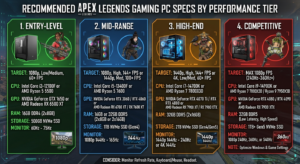
The terms entry-level, mid-range, high-end, and competitive are useful ways to organize a buying guide, but they are not official EA categories.
Entry-Level Gaming PC
An entry-level Apex gaming PC should focus on meeting the game’s requirements while maintaining a balanced configuration.
EA’s minimum requirements provide the official baseline, but new buyers should consider modern components rather than purchasing old hardware simply because it meets the published minimum.
Mid-Range Gaming PC
A mid-range system provides more performance headroom and can be a practical choice for players who want to play Apex Legends alongside other games. The goal should be a balanced CPU and GPU combination with sufficient RAM and SSD storage.
High-End Gaming PC
A high-end PC is aimed at players who want stronger performance, higher resolutions, demanding settings, or additional headroom for other demanding games.
Even at this level, balance remains important. Intel recommends matching CPU and GPU capabilities instead of making one component disproportionately powerful.
Competitive Gaming PC
A competitive setup generally prioritizes consistent performance, high frame rates, and a suitable high-refresh-rate display.
Rather than maximizing every graphics setting, competitive players may prefer settings that provide the responsiveness and visibility they want.
Read more: Gocryptobet.com Wallet Review 2026: Is It Worth Using?
Apex Gaming PC vs. Gaming Console
Both PCs and consoles can provide a good gaming experience, but they work differently.
Performance and Graphics
PC hardware can be selected and adjusted by the user, while console hardware is fixed. Apex Legends provides PC players with multiple graphics options, giving them control over aspects of the game’s visual presentation.
Upgradeability
One major advantage of a desktop PC is upgradeability. Components such as storage, RAM, GPU, and other hardware can potentially be replaced or upgraded. However, compatibility must always be checked before an upgrade.
Game Selection and Features
Apex Legends is available on PC and multiple console platforms. PC gaming also provides access to applications and games beyond a console ecosystem, making a desktop computer more versatile for users who want one device for several purposes.
Cost and Long-Term Value
A console can be attractive for straightforward gaming, while a PC can offer greater flexibility and upgradeability. The better value depends on your budget, gaming habits, existing equipment, and how important customization is to you.
Common Mistakes When Choosing a Apex Gaming PC
Focusing Only on the Graphics Card
A powerful GPU does not automatically make an entire gaming PC powerful. Intel explains that both CPU and GPU can become bottlenecks, making balance important.
Buying Too Little RAM
Do not look only at the minimum requirement. EA lists 6 GB as the minimum and 8 GB as recommended for Apex Legends, while Intel identifies 16 GB as an increasingly common gaming standard.
Ignoring Cooling and Power Requirements
The PSU and cooling system support the stability of the entire PC. Choose components according to the requirements of the complete system rather than treating them as secondary purchases.
Choosing Components Without Checking Compatibility
Check CPU and motherboard compatibility, RAM support, GPU dimensions, power requirements, cooling clearance, and available storage connections before purchasing components.
How to Choose the Right Apex Gaming PC
Set Your Gaming Budget
Decide your complete budget before selecting individual parts. Include the monitor and peripherals if you need them.
Consider the Games You Play
If Apex Legends is your primary game, you can optimize the system around its requirements and your desired performance. If you also play demanding games, choose hardware with those titles in mind.
Decide Your Target Resolution and FPS
Choose your preferred resolution and target frame rate first. These decisions help determine the appropriate GPU and monitor. Intel recommends considering the display alongside the CPU and GPU so the system is balanced around the intended experience.
Think About Future Upgrades
If you want to keep the PC for several years, consider future storage, RAM, GPU, and other upgrade possibilities when choosing the motherboard, case, PSU, and cooling system.
Is an Apex Gaming PC Worth It?
An Apex gaming PC can be worthwhile for players who want customizable hardware, adjustable graphics settings, upgradeability, and the ability to use one computer for gaming and other tasks.
However, you do not need an expensive high-end system simply to play Apex Legends. EA’s official requirements show that the game can operate on relatively modest hardware, while a newer system can be selected when you want higher performance or broader gaming capabilities.
The best decision depends on your budget, preferred resolution, FPS target, other games, and future plans.
Final Thoughts
The right Apex gaming PC does not have to be the most expensive computer available. What matters is choosing balanced hardware that matches your target resolution, frame rate, games, and budget.
The CPU and GPU should complement each other, RAM should be sufficient for your workload, SSD storage can improve loading and responsiveness, and the power supply and cooling system should properly support the complete build.
Start by deciding what you want from Apex Legends. Then choose your hardware around that goal, pair the PC with an appropriate monitor, and optimize your software and graphics settings.
FAQs About Apex Gaming PC
What specs should an Apex gaming PC have?
EA lists 6 GB RAM and GTX 950-class graphics as minimum requirements, with 8 GB RAM and GTX 970-class graphics in its recommended specification. For a new PC, choose modern hardware based on your target resolution, FPS, and budget.
How much RAM is recommended for gaming?
EA recommends 8 GB of RAM for Apex Legends, while 16 GB is a common choice for modern gaming and multitasking. The right amount depends on the games and applications you run.
What GPU is best for high-FPS gaming?
There is no single best GPU for every gamer because performance depends on resolution, settings, CPU, and target FPS. Choose a graphics card that matches your gaming goals and monitor.
Is an SSD important for a gaming PC?
Yes, an SSD can provide faster data access and reduce game loading times compared with a traditional HDD. However, an SSD does not replace the need for a capable CPU and GPU.
How can I improve gaming performance on my PC?
Update graphics drivers, optimize game settings, close unnecessary background apps, and check system temperatures. These simple steps can improve performance before you consider upgrading your hardware.